UI Design Enhancement for Faster Application Navigation
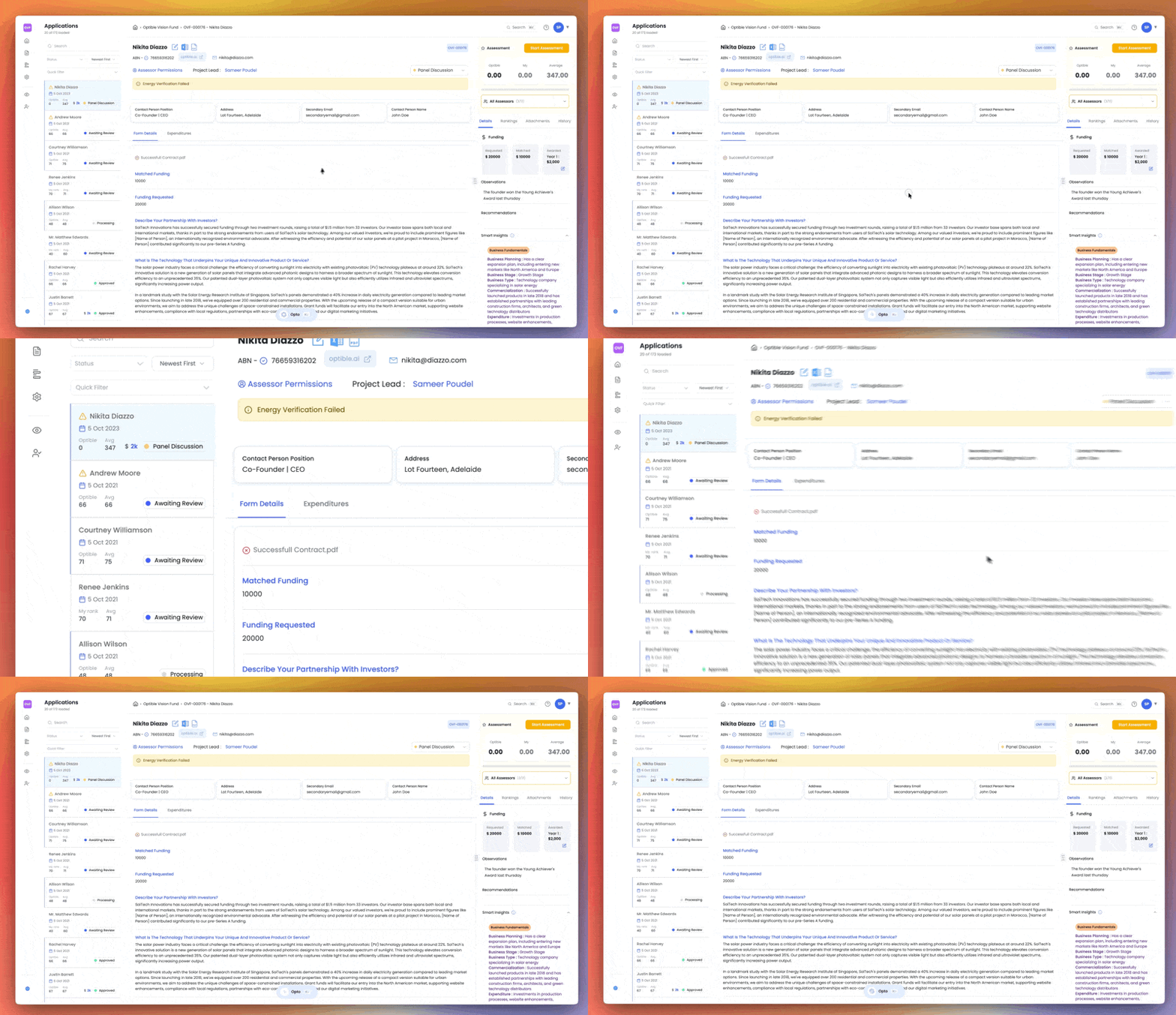
We've redesigned the Optible experience from the ground up. Every screen has been rethought to help you work faster, find what you need sooner, and stay focused during assessments.
Here's what's new.
A cleaner homepage
Your grants are now front and centre when you log in. If you manage multiple grants, they're all listed on the homepage. If you only have one, you'll skip straight to the application list with no extra clicks.
Everything related to your grant lives on the left-hand side, and your personal settings are grouped together in one place. Switching between grants is now just a click away from the sidebar.
Sidebar that actually makes sense
Forms, reports, and grant settings all sit together in the sidebar. Grant settings let you manage assessors, application stages, and more from a single location. These options used to be scattered across the platform, so we've brought them all under one roof.
Quick Actions panel
A new Quick Actions panel on the homepage surfaces what needs your attention. You'll see applications that haven't been ranked or assessed by you yet, anything assigned to you, and filters by status (group, collective, or individual).
Smarter quick filters
Pinned filters now appear in a dedicated quick filters area at the top of the application list, making them much easier to reach.
Visual cues for unranked applications
Any application you haven't ranked yet shows a blue border on the left side. At a glance, you can tell exactly which applications still need your input. Once you've ranked it, the border disappears.
Redesigned application detail page
The application detail page has been rebuilt. Warnings and important flags sit at the top of the page, and the form layout is much clearer.
Attachments are now embedded directly within the form. If a question references a document, you can view it inline in a side-by-side panel without switching tabs. You can also resize the panel, open the document in a new window, or download it directly.
Improved ranking and assessment view
Eligibility checklists and assessment criteria are now clearly separated. You can see rankings and average scores at a glance, and a reasoning tab shows Optible's reasoning in a table view so you can see how assessments compare across your team.
The All Assessors section shows who has assessed each application and how much they've contributed. A Details tab includes funding information, smart insights, observations, and recommendations.
Start Assessment mode
This is a brand new, immersive assessment experience. It strips away everything unnecessary and gives you a wider, focused view. You can see the criteria description, input your ranking, and watch scores update in real time as you go, making it easy to understand how your input affects the final outcome before you submit.
This update will be available to you shortly. If you have any questions or feedback, please reach out to our team.
You can watch our video here: https://go.optible.ai/ffI8ht
What's new
Salesforce Integration
Connect Optible directly to your Salesforce organisation for seamless bi-directional sync of applications, contacts, and grant data. Once connected, changes in either system automatically reflect in the other—no manual exports or imports required.
Applications submitted through Optible appear in Salesforce as leads, status updates flow both ways, and your team maintains a single source of truth across platforms.
SmartyGrants Integration
Import applications and grant data from SmartyGrants with standardised sync workflows. Connect your SmartyGrants account and Optible automatically backfills existing data, then maintains ongoing sync for new submissions and updates.
External Eligibility Validations
Automatically validate ABN, ACN, and Consumer Affairs registration during application submission. The system checks external registries and flags issues before applications enter your review queue, reducing manual verification work.
AI & Smart Insights
Add description field to Smart Insights categories for clearer, more targeted insights
Improved AI guidance quality and model capabilities
Enhanced context quality for conflict of interest observations
Integrations & Data Sync
Generate display IDs for multiple grants in a single request
Support for complex form structures in integrations
Improved cross-grant workflows for multi-program organisations
Automatic data backfill after connecting new integrations
Enhanced sync for funding disbursements and budget allocations
Criteria rankings now sync to external systems automatically
Smart Insights sync to connected platforms
Migrated ABR validation to improved endpoint for better reliability
Improvements
Backend & Performance
Automatic email sending when templates are enabled
Enhanced email scheduling with validation and audit trails
Improved reliability and automatic retries for data syncing
Better error handling across all sync operations
Cleaner service organisation for easier maintenance
Dashboard & Data Management
Bulk status changes to Rejected directly from application lists
Database
Enhanced ID system for better readability and performance
Support for repeatable form sections in responses
Improved tracking for scheduled emails
Better metadata storage for integration history
Editor & Form Builder
Prevent invalid field type combinations in repeatable sections
Visual preview of repeatable fields while building forms
Drag-and-drop for rearranging repeatable fields
Support for custom top-level domains in email fields
DOCX and Excel file validation
Frontend & Interface
Upload guidelines shown to applicants for required formats
One-click toggle for automatic email sending
Cleaner interface after validation improvements
Connection management dashboard showing sync status
Display average criteria rankings on application pages
Improved filter interface based on user feedback
Active filter summary to prevent mistakes
Email template variable preview
Better modal scrolling on all screen sizes
Date formatting improvements in list views
Search & Navigation
Quick "Jump to" search for any record
Maintain your position when returning to filtered lists
Settings
Centralised view of all validation rules
Enhanced Smart Insights category management
General
Status-based email triggering to prevent accidental sends
Full comment history in ranking summaries
Improved form submission handling for repeatable sections
System cleanup for better stability
Bug fixes
Data & Syncing
Include submission timestamps and creator info in application lookups
Fixed handling of special characters in AI-generated insights
Preserved historical funding records during updates
Correct reviewer attribution in Salesforce sync
Forms & Validation
Fixed cached dropdown values showing outdated options
Email templates now accept both scheduled and status-triggered configs
Prevented duplicate text in textarea fields

Australia
Lot Fourteen, North Terrace
Adelaide SA 5000
United Kingdom
64 Nile St, London N17SR
United States
904 High St, Palo
Alto CA 94301